GTA 6 Beginner's Guide: 25 Tips From Real Gameplay
We played GTA 6 on PS5 before writing a word. These are the 25 things we wish we'd known on the first boot: the settings, the house, the car trunk, the police description and Focus. No story spoilers.
This article is the written companion to our video. Watch it on YouTube and subscribe to GameSight for every GTA 6 breakdown.
In this article
- Tips 1-4: settings to change on the first boot
- Tips 5-10: your house is your base
- Tips 11-12: your car is a garage and a wardrobe
- Tips 13-16: how the police find you, and how to lose them
- Tips 17-18: cars and guns, before you commit
- Tips 19-23: body, Focus and buffs
- Tips 24-25: collectibles and fast travel
- Our take: play it like a life, not a rampage
- FAQ
The best GTA 6 beginner tips are about the systems GTA 5 never had: a house you look after, a car trunk that holds your spare outfits, police who work from a description of you, and a Focus bar you fill by being kind. Everything below comes from the GameSight team's own PlayStation 5 gameplay, recorded on November 18, 2026, the day before the worldwide launch. There are no story spoilers and no cutscenes.
The video above walks through the same 25 tips on screen. This page puts them in order, so you can check one quickly before you play. If you haven't started yet, read our GTA 6 things to know before you play for the pre-launch facts and 25 things you should never do on day one for the mistakes. This guide is the hands-on part.
Tips 1-4: settings to change on the first boot
1. Don't rush the first boot
Official Before the game starts, it asks how you want the minimap, the text size, the subtitles and the brightness (seen in our PS5 gameplay). Spend 30 seconds here. The brightness setting matters most, because Leonida's nights are dark, and a well-set screen makes them much easier to read. If you get one wrong, it's fine: every one of these can be changed later in Settings.
2. Mute Licensed Music and check HDR
Official Under Audio there's a switch called Mute Licensed Music (seen in our PS5 gameplay). If you stream or record your gameplay, turn it on so radio songs don't get your videos claimed. Then go to Display and check HDR. If your TV isn't a true HDR screen, turn it off, and set the safe zone so the HUD isn't cut off at the edges of the picture.
3. Give the aim assist an hour
The aiming feels unfamiliar at first, even if you have hundreds of hours in GTA 5. Our read after playing: it's a different feel, not a broken one, and it becomes natural within about an hour. Official If the button layout itself bothers you, Settings has alternate controller layouts (seen in our PS5 gameplay). Try those before you change sensitivity.
4. Learn the map early
Official Zoom the map all the way out and Leonida is divided into counties, including Vice-Dale, Kelly, Leonard and Lummox, which makes directions much easier to follow (seen in our PS5 gameplay). Zoom back in and the map goes from the whole state down to the inside of your own house, so you can see exactly where the nearest shops are. For the regions themselves, see our GTA 6 map guide.
Tips 5-10: your house is your base
The house is the biggest surprise for GTA 5 players. It's not just a save point.
5. Drinks in the kitchen, clothes in the wardrobe
Official The game tells you right away that there are drinks in the kitchen and clothes in the wardrobe (seen in our PS5 gameplay). Grab a drink before you head out (tip 23 explains why), and when you need a quick change, you don't need a store: your clothes are at home. The game also hints that there's more to find around the house and the street outside, so take a walk.
6. Feed your pet snake
Official Yes, there's a pet snake. It lives in a tank in your house, and you can feed it (seen in our PS5 gameplay). It's a small thing, but looking after your home is now part of the game, and moments like this make the place feel lived in.
7. Stash your cash
Official You start with less than $1,000, and there's a hidden stash in the bedroom floor (seen in our PS5 gameplay). The game's own loading tip says to keep cash safe by storing it at home. Put your spare money there instead of carrying it all, and don't spend it on the first gun you see. Our GTA 6 money guide covers the rest of the economy.
8. Sleep skips time
Official Your bed lets you rest and jump ahead in time, and your phone has an alarm, so you can sleep straight through to the morning (seen in our PS5 gameplay). If a night is too dark, or you want daylight for a long drive, go to bed.
9. Repair your house
Official The house needs work, and a neighbor even points it out. You can put up drywall, climb onto the roof and nail down new shingles, and paint the rooms any color you like (seen in our PS5 gameplay). It isn't busywork. Fixing up your home base is one of the best things to do between missions.

10. Help your neighbors
Official Open the map and check the Exploration tab. You'll find small favors, like a neighbor named Shirley asking you to pick up rum from the store, and finishing them gives you a Focus boost (seen in our PS5 gameplay). They're quick and they pay off later, so when a neighbor asks, say yes.
Tips 11-12: your car is a garage and a wardrobe
11. Fix your car at Joey's
Official Joey's mod shop repairs your car for free before you start modding it. Some paint colors cost nothing, and engine upgrades start at around $100 (seen in our PS5 gameplay). You can also call Joey from your phone contacts to have your car repaired or delivered.
12. Use the trunk as storage
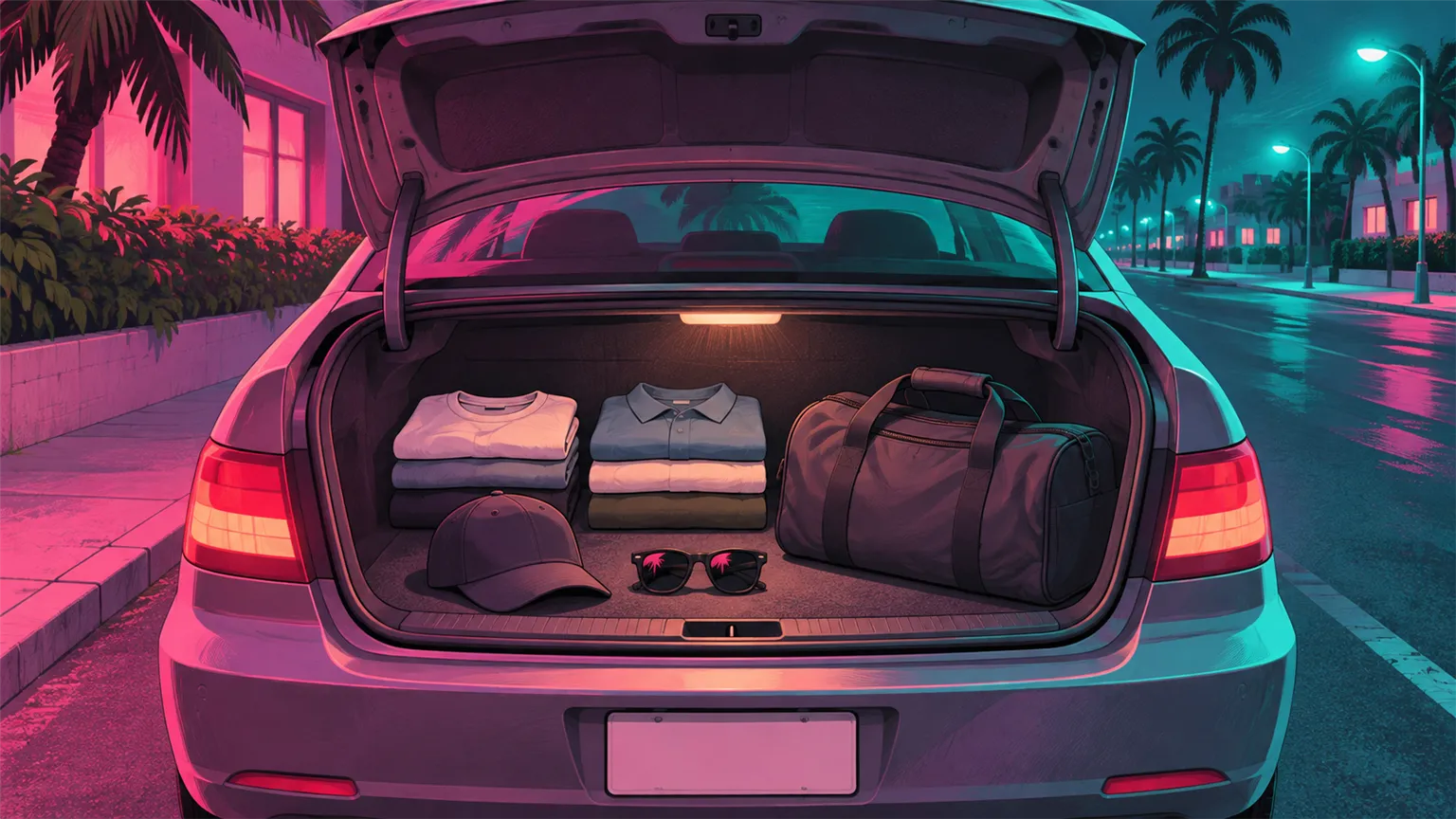
Official You can stow bags and items in any car's trunk, including your own, and you can send outfits from your wardrobe to the car (seen in our PS5 gameplay). This is completely new compared with GTA 5. Keep two or three spare outfits in there. The next section shows why.
Tips 13-16: how the police find you, and how to lose them
The wanted system is where GTA 5 habits hurt the most. The police don't just chase a dot on the map; they work from a description.
13. Everything goes on your criminal profile
Official The game warns that what you do goes on your criminal profile and can have a lasting impact. Holding the D-pad shows your current status (seen in our PS5 gameplay). The more trouble you cause, the harder it gets to blend back in. Our criminal profile explainer has the background from Rockstar's previews.
14. Read what the cops know
Official While you're wanted, the map shows exactly what the police know: your vehicle, your appearance and your outfit (seen in our PS5 gameplay). Each one is something you can change. Change all three and you go from most wanted to just another face in Leonida. For the full system, see our wanted system guide.
15. Respray the car they know
Official If the police know your car, drive into a body shop, pick a new paint and roll back out. In our gameplay, a police car drove straight past the car it was looking for after the respray. Repair the damage while you're there, so the car doesn't look like it just left a chase.
16. Glasses and a spare outfit
Official A hat or glasses lowers how easily you're recognized, and swapping into a spare outfit from your trunk makes the clothing description useless (seen in our PS5 gameplay). No clothing store needed. This is the payoff for tip 12.
Tips 17-18: cars and guns, before you commit
17. Use the car app
Official The car app on your phone tells you whether a car is locked or unlocked before you try to steal it, and a stats card pops up every time you get into a car (seen in our PS5 gameplay). That saves time and avoids unwanted attention. More in our stealing cars guide.
18. Try before you buy at Ammu-Nation
Official At Ammu-Nation you can fit attachments and watch a weapon's stats change live before you pay, and the store has an apparel side with gear like fishing clothes (seen in our PS5 gameplay). A rifle there costs around $450. When you start with under $1,000, try everything first. See our weapons list for what's been shown.
Tips 19-23: body, Focus and buffs
19. Your body changes
Official The pause menu stats track sleep, nutrition, calories, body fat and muscle, and they feed into your strength and cardio (seen in our PS5 gameplay). What you eat and how much you work out matter. Our weight and gym explainer goes deeper.
20. Check the fitness app
Official A fitness app on your phone shows your strength, cardio and Focus levels, plus your body and nutrition (seen in our PS5 gameplay). Workouts level these up over time, so a few early sessions pay off.
21. Use Focus to find sounds
Official Click both sticks and Focus shows where nearby noises are coming from (seen in our PS5 gameplay). It's ideal for finding something you can hear but can't see. Leonida is full of small sounds that lead somewhere, so keep your ears open.
22. Kindness fills Focus
Official Petting animals and other thoughtful actions increase your Focus bar, and the game says how much depends on your criminal profile (seen in our PS5 gameplay). So yes, petting animals is a real strategy.
23. Eat and drink before you go
Official A drink at home buffs your stamina and your Focus, and a button prompt shows your health, stamina and Focus at a glance (seen in our PS5 gameplay). It isn't decoration. Top up before a long session out.
Tips 24-25: collectibles and fast travel
24. Pick up magazines and books
Official Magazines and books lying around are collectibles, 27 of them, found on racks and tables at home and in shops (seen in our PS5 gameplay). Flip through them: the fake ads inside are classic Rockstar satire, and some are genuinely funny.
25. The taxi is your fast travel
Official Call Paradise Taxi from your phone contacts and it takes you anywhere, including straight home or back to your car (seen in our PS5 gameplay). When the map feels huge, it saves a lot of driving.
Our take: play it like a life, not a rampage
After our first hours, the clearest lesson is that GTA 6 rewards preparation more than any GTA before it. The tips that matter most connect to each other: outfits go from the wardrobe to the trunk, the trunk beats the police description, a drink at home fills Focus, and Focus helps you find what the map doesn't show. Players who treat the house, the car and the phone as tools will have an easier first week than players who head straight for trouble.
The other lesson is to slow down. You start with less than $1,000, the criminal profile remembers what you do, and the police remember what you look like. None of that punishes you for exploring, but it does punish GTA 5 habits. We'll add new tips here as we play more during launch week.
FAQ
What should I do first in GTA 6?
Set the brightness, subtitles and minimap on the first boot, then check Mute Licensed Music and HDR in Settings. After that, walk around your house: grab a drink, feed the pet snake, put spare cash in the bedroom stash and send a few outfits to your car. All of this was in our PS5 gameplay.
How do you lose the police in GTA 6?
Check the map while you're wanted: it shows whether the police know your vehicle, your appearance or your outfit. Respray the car at a body shop, put on glasses or a hat, and swap into a spare outfit from your trunk. Change all three and the description no longer fits you.
How do you fast travel in GTA 6?
Call Paradise Taxi from the contacts in your phone. In our gameplay it took us anywhere on the map, including straight home or back to our car.
What is Focus in GTA 6 and how do you fill it?
Focus is activated by clicking both sticks and shows where nearby sounds are coming from. Petting animals, other kind actions, neighbor favors and food or drink buffs fill the bar, and the game says the amount depends on your criminal profile.
Can you store things in your car in GTA 6?
Yes. Any car's trunk can hold bags and items, and you can send outfits from your home wardrobe to your car. That makes the trunk a mobile wardrobe for escaping the police.
Does this guide have story spoilers?
No. Every tip comes from early free-roam systems in our PS5 gameplay: settings, the house, the car, the police, Focus and travel. There are no missions, cutscenes or story details.
Sources

We research GTA 6 from official sources and label every claim as official, reported or rumor. How we work · GameSight on YouTube
Keep reading

Guides
Is GTA 6 Down? GTA 6 Server Status and Not Working Fixes
GTA 6 is a single-player game at launch, so when it won't start on November 19, the problem is usually your console, store or licence, not a Rockstar server. Here's how to tell the difference and what to try, symptom by symptom.
 Video + notes
Guides
GTA 6 Tips: 25 Things You Should Never Do on Day One
GTA 5 habits will cost you in Leonida. Here are 25 things you should never do when GTA 6 releases, each one traced to what Rockstar has shown or said, and labelled official, reported or our advice.
 Video + notes
Guides
How Long Is GTA 6? Story Length, Missions and 100% Hours
One report says 50 hours for the story. A Rockstar studio head says his run took 80. The Platinum may need 200. Here is every GTA 6 length figure, labelled, next to GTA 5 and Red Dead 2.


